Friday, August 26, 2011

{ Be a Better Event Planner } Handling client email


Wrapping up a recent corporate event, I noticed that there were 258 emails in the folder I had set aside for this client. I'm sure there will be a few more when you take into account post-event recaps and invoices. Even with the low, conservative estimate of five minutes spent working on each emailed request or action item, that's almost 21 hours of event planning work based on emails alone. In reality it's probably far more.

As an event planner, are you accounting for the work you do over email when you are estimating the job for the client and planning out your workflow? I'd love to hear your thoughts.

Thanks to Ramberg Media Images for the graphic.

Wednesday, July 20, 2011

Blogging for your Event Planner Business


EJP Events is no stranger to event planner blogging - and Special Events magazine noticed that today, asking us to share some thoughts about why an event planner would blog and what's in it for them as a business.

You can read the entire article, "Event Pros Who Make Blogs Pay Off" at Special Events Magazine's website. Thanks to editor Lisa Hurley for reaching out to us and quoting us in the article.

Photo credit: Ed Yourdon on Flickr

Thursday, June 9, 2011

Favorite iPhone apps for Event Planners


Planning an event is so much easier with a smartphone, don't you agree? While I know there are lots of choices out there, it seems the tool of choice in the special events world is, surprise, surprise -- the iPhone from Apple. I thought it would be fun to make a list of the apps I can't seem to live without, and see if you all agree.


- Sunrise, Sunset Does what it says on the box. Calculates sunrise and sunset times. Perfect if your client is wondering if they need additional lighting, or if they'll get enough use out of their candles or twinkle lights.

- TideApp if you're doing an event on the beach, you need a tide table! Otherwise your wedding ceremony or employee picnic could end up with cold, wet, feet!

- SoundLevel Never get busted again, keep the neighbors happy, and stay on the good side of the law. This app is a decibel meter. Simply stand at the borders of your event and check to make sure you are within the legal limits (usually 80 dB within a city).

- Google Apps (Calendar, gmail, Tasks, Documents) Not specifically for event planning, but oh so helpful to have your calendar, email, and task list in the cloud so you can check it at any time. You can also share with employees or contractors at different levels of security so everyone has the latest updates.

- Bar Stocker I might be cheating a little bit, since this is my own app. But it was so annoying to open Excel every time I wanted to calculate how much liquor, beer, and wine I needed for my upcoming events. Bar Stocker lets you input number of guests, length of event, season, and type of attendees and does all the work for you.

- AccuWeather Premium . Critical for your outdoor events, for travel, and just all around good to know weather information. I pay additional for the premium service so I can get a detailed 15-day-forecast.

- Tally Counter How many people actually attended the event? Tally Counter lets you stand in the back and click as you count heads.

- iHandy Level Is that picture of the retirement party honoree level? Is the arbor you're setting up perfectly straight? This app makes use of the iPhone accelerometer so you can check.

and of course, what busy event planner could live without...
- Chipotle Ordering
I'm only half kidding. If it weren't for Chipotle on those on-the-go days I wonder what I would eat.

What are your favorite special event planning iPhone apps? Do please share!

Tuesday, November 24, 2009

Email etiquette tip: the BCC (Blind Carbon Copy) field

Here's an email etiquette tip some may not know: when you CC: (Carbon Copy) an email to a list of unrelated contacts from your regular account, it is considered to be poor etiquette. This is because all who receive the email will then be able to view each other's private email addresses. Your contacts may or may not wish to have their personal or work email broadcast far and wide, and it's safer to assume that they would rather not.

Next time, use the "BCC:" (Blind Carbon Copy) function to send an email like this. Put your own email address in the TO: field, which  sends it to yourself. Put the list of email addresses that you're sending to in the BCC: field to keep everyone's email private.

Technorati short code: 6PRGAEPTKZCY

Friday, November 20, 2009

Need a deal on event space? Ecotrust is offering Community Grants to nonprofits


I am often contacted by non-profit groups looking for a planner to help them find affordable meeting and event space. Community groups should note that Ecotrust is offering Community Grants for just this purpose.


I love that one of the preferential criteria is "Events that are unabashedly hopeful in nature"!

Note that Community Grants cover the cost of space rental only, but not support services such as catering or rentals.

Deadline is January 21, 2010, so get cracking.

Thursday, November 19, 2009

What your Facebook and Twitter savvy says about your business

We've recently seen several colleagues of ours in the event industry fall victim to the common "phishing" attacks on Facebook and Twitter. These attacks pose several problems for event planners beyond the immediate inconvenience that one might imagine.

Because so many event planners accept business contacts, clients, peers, and suppliers into their Facebook friends list, a compromised account represents much more than a minor inconvenience. Getting your Facebook account phished or hacked not only is an annoyance to your friendslist, but hurts your credibility with your business contacts with whom you are connected. Some compromised accounts have been sending me spam messages for weeks. If you are trying to build a trusted event planning brand, it can really hurt you to look like a social media newbie.

Bottom line: don't click on links you don't trust. If a Facebook or Twitter contact who is normally professional in manner suddenly sends you a message with poor spelling or questionable content, especially with links to purported videos or pictures of you, do not click. It's likely their account has been compromised, and if you click, yours will be too. Never enter your Facebook or Twitter password on external sites you are not sure of. Check with your IT department, or a knowledgeable friend before signing up for any services. Change your password immediately if you think you've been compromised. If you can't seem to get rid of he attacks, it may make sense to have your account deactivated and start anew.

In addition to avoiding phishing and hacking, consider how the following actions affect your reputation in the event planner and social media community:

- If you play Facebook games like Farmville, L'il Green Patch, or Twitter games like Mafia Wars, or even simple quizzes like "What kind of Drunk are you?", consider before clicking on links that invite your friends list if your contacts include business and event planning contacts. Do your clients and associates really want to know you're playing these games in the middle of the day?

- If you get too many requests, there's no harm in choosing the "Ignore" button. No one will be offended if you don't accept their 45th "Causes" invitation; in fact, many users don't know that they can skip the Invite Friends function on most Facebook applications. Remember that you can accept a request to participate in an application and SKIP the invite function. You can take a quiz without posting it to your Wall or involving your entire friends list.

- If you're worried about business contacts seeing too much personal information, why not set up a Fan Page for your business and keep your personal profile private? You can always set different profile groups in your personal profile and limit their access to your personal profile so you can still accept "Friend" requests from all contacts out of courtesy. At the same time you can control who can see your personal photos -- so your business contacts aren't subjected to photos of your big night out at the bar in their home feed. Caveat: nothing posted to the Internet is ever truly secure, no matter what a site might tell you, so be careful what you post, even if you use limited or locked profile lists.

Image courtesy benstein on flickr.

Wednesday, November 18, 2009

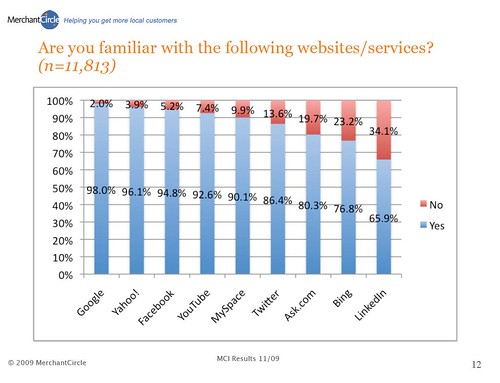
MerchantCircle Small Business Confidence Poll


MerchantCircle.com recently published its Merchant Confidence Survey and the results are interesting:

48.3% of respondents agreed with the statement "My business will survive the recession."

57.9% of respondents said YES to the statement, "If you had to start all over again, would you start your business in today's economic climate?"

86.4% of respondents said they were familiar with Twitter, while only 65.9% said they were familiar with LinkedIn.

For the full report, follow this link to MerchantCircle.com's Merchant Confidence Survey 2009.